The export is all you have.
A seller in diligence, a new client, a year-end catch-up: nobody is handing over a login. FinStat works from the export and the statements.
FinStat is the accounting engine your AI runs: it rebuilds and audits the books from exports and statements, and hands every open question back to your AI with its evidence. Here is how that compares with Rillet, QuickBooks and Digits.
| Criterion | FinStat | Rillet | QuickBooks Online | Digits |
|---|---|---|---|---|
| Who runs it | Your AI, end to end, over MCP. There is no FinStat app to operate. | Rillet's app and its Aura AI; an MCP server with read and write tools. | The QuickBooks app; a Claude and ChatGPT connector for invoices, imports and reports. | The Digits app and its AI; a read-only MCP server and a write API. |
| How you work with it | Tell your AI the goal. It handles the details with FinStat. Almost nothing to learn. | Rillet's app, with workflows defined in it — Aura Flows orchestrate multistep processes. | QuickBooks' app and its workflows; the connector covers a set list of tasks. | Digits' app, with its Inbox for exceptions. |
| What the books are built on | Every obligation and money movement, resolved from the documents upstream of any chart. The chart is a projection, so one set of facts can carry several charts as views. | A general ledger organized by its chart of accounts, with dimensions. | A general ledger organized by its chart of accounts. | A general ledger organized by its chart of accounts. |
| The AI | Deterministic engines settle everything arithmetic can. Frontier models from OpenAI, Anthropic and xAI each get one bounded question at a time: PDF extraction, reconciliation, counterparty identity, FAR-level judgments. | Aura AI: agents embedded in the GL for flux analysis, accruals, reconciliation and revenue recognition. They propose; a person approves. | Intuit AI agents for accounting, payments, sales tax and finance categorize, reconcile and prepare reports, with the user reviewing and approving. | Custom-trained ML models and a knowledge graph, trained on its own transaction history, auto-book most transactions; exceptions go to a person. |
| What's left over | Returned to your AI as review items, each with its source page. Your AI clears what the documents settle and asks you the rest. | 95%+ auto-matched; for the rest, “a list of most probable” matches for a person to pick. | Reconciliation and review stay in QuickBooks, done by a person. | 95%+ auto-booked; exceptions go to the Digits Inbox for human review. |
| PDF statements | Batches, handled by your AI; every statement proven against the bank's printed balances, or refused with the reason. | Not published. Bank data arrives through Plaid and custom bank feeds. | One statement per upload, with side-by-side review. | Reconciles from uploaded statements; PDF extraction not published. |
| Banks with no feed | PDF statements from banks worldwide — statement reading built on the history of BadBank, FinStat's predecessor, across 36 currencies. Custom feeds: your AI maps them and hands them to FinStat. | Feeds through Plaid in the US, Canada and 14 EU countries (UK pending), plus custom bank integrations. | Bank feeds by region; PDF statements one upload at a time. Multicurrency on Essentials and above. | Integrations with banks and fintech tools; PDF statement extraction not published. |
| Bank connections | Coming soon: connect through Plaid (12,000+ institutions) for the digital transactions and, in the US, the bank's own PDF statements — the evidence FinStat checks against the printed balances and seals. | Plaid feeds for transactions and balances, plus custom bank integrations. | Bank feeds built into QuickBooks. | Plaid, for transactions and balances. |
| Books from another system | Self-serve: the QuickBooks Online export rebuilt into complete books, with the export's own discrepancies reported. | Done for you by Rillet's CPA-led team; they quote 4–6 weeks. | Spreadsheet imports of lists and transactions, each under 1,000 rows. | Journal-entry and bank-transaction imports; a full-history migration is not published. |
| Error analysis | A whole-book audit: arithmetic controls, plus findings that cite the entries they rest on — purchases posted to income, opening bills expensed twice, refunds that exceed the sale. | Flux analysis: month-over-month, quarter, year and budget variances, explained. | Report Insights flags anomalies on the P&L and balance sheet (Plus and above); Books review checks for open items. | Automated quality-control checks, including 11 built in (negative balances, clearing accounts) and custom ones. |
| Tools for your AI | Parse 14 document types — statements, invoices, bills, credit and debit notes, receipts, processor settlements, payroll — each checked against its accounting law and sealed; export QuickBooks, Xero and Sage import files (QBO, OFX, CSV); render PDFs from data; verify documents; detect tampering. | MCP and API for invoices, payments, contracts, vendors and reports. | Connector for invoices, estimates, transaction imports and reports. | Read-only MCP; Connect API for syncing transactions and bills. |
| Counterparties | Banks and companies identified from FDIC and IRS records, EIN included, and available to your AI. | Vendor legal name and remit-to address; 1099 tracking. No tax ID field published. | W-9 collection gathers a contractor's name, address and tax ID. | Party research adds logo, description and contact details. No tax ID published. |
| Your data | Sealed documents you keep on your own machine, readable by your AI, as well as in your FinStat workspace. Pull, store, change and view them as you like. | Kept in Rillet's cloud; read through its app, API and MCP. | Kept in QuickBooks' cloud; reports and exports from the app. | Kept in Digits' cloud; read through its app, API and MCP. |
| Your file | Your choice. FinStat can be your system of record, or work beside the one you keep, from its exports and documents, without changing it. | Rillet is the system of record. | QuickBooks is the system of record. | Digits is the system of record. |
| Pricing | You pay for the work FinStat does, not for holding your data. 1,000,000 free tokens, no seats, no per-client fee. | Implementation $10K–$30K (Rillet's own figure), plus subscription. | Monthly subscription by plan. | Subscription. |
Competitor columns state what each vendor publishes, as of September 2026, with sources below. “Not published” means we found no public documentation, not that the feature cannot exist.
Each of these systems automates most of its matching internally. Their APIs and MCP servers read reports or push transactions in. What is left over — the unmatched, the uncategorized, the questions — lands in a review queue inside their app for a person to clear.
FinStat hands those items to your AI, each with its evidence. Your AI clears what the documents settle and asks you only about the rest. The books come back finished, with the open questions named.
FinStat is there for your workflow; it does not define it. Rillet’s Aura Flows and the other systems’ apps give you their workflow to learn and follow. FinStat is built for your AI: you talk in goals — “rebuild last year from this export”, “what doesn’t tie?” — and your AI handles the details. There is almost nothing to learn.
Rillet, QuickBooks and Digits are built around their own apps. Your data is captured into their cloud, your books live there, and the monthly subscription pays for keeping them there.
FinStat is built around the accounting. Every document it checks is sealed and handed back to you, so your data can live on your own machine, where your AI can read it directly, as well as in your FinStat workspace. Pull it, store it, change the view, take it to another system. You pay only for the work FinStat does, never for holding your data.
Chart-centric systems record each transaction as a posting to an account, so the chart is the books. FinStat works far upstream of the chart: it uses mathematical structures that resolve every obligation and every money movement from the documents — who owed whom, what was paid, what cleared. That is the reality. A chart of accounts is an opinionated projection of it.
That is why FinStat can hold several charts over the same facts — a tax view, a management view, a lender’s view — and why the books stay accurate when the chart changes. Guessing a category from a transaction’s description is what rules engines and machine-learning categorizers do, and the hard cases are left for you to clean up. FinStat categorizes from what actually happened: the payment event, the counterparty, the obligation it settles, and the accounting decision behind it. Its AI goes where that work is hard: reading large and difficult statement PDFs, reconciling them to the bank’s own printed figures, identifying counterparties, with EIN where public records carry one, and making FAR-level accounting decisions.
Deterministic engines settle everything arithmetic can, exactly and repeatably. The frontier models get only what is left, split into bounded questions answered in parallel, so a job costs and takes what its hard parts need and no more. It is built the way high-performance trading and simulation systems are built, by people who built those.
With FinStat connected, your AI turns PDFs into data it can trust. FinStat reads fourteen document types in three mathematical forms, and checks each one against the law of its form before it is accepted:
A document that is missing required data, or does not satisfy its law, is refused with the reason. One that passes is sealed. The data stays in clear text for anyone to read; the seal means any later change is detectable, so every time it is used after that, it is known to be what FinStat checked.
From there your AI can produce import files for QuickBooks, Xero or Sage, render a clean PDF from data, and verify any document it is handed. Where your client has no feed, the PDFs are the books; where it has a custom feed, your AI maps it and hands it to FinStat.
Simply ask your agent, and FinStat will generate a viewer for your books: one standalone file you open in a browser, with the accounts, the charts, the documents and every number traced to its source. Your AI shapes it to your situation — the views a lender needs, the ones a tax preparer needs, the ones you check every Monday — and it works offline, from your own machine.
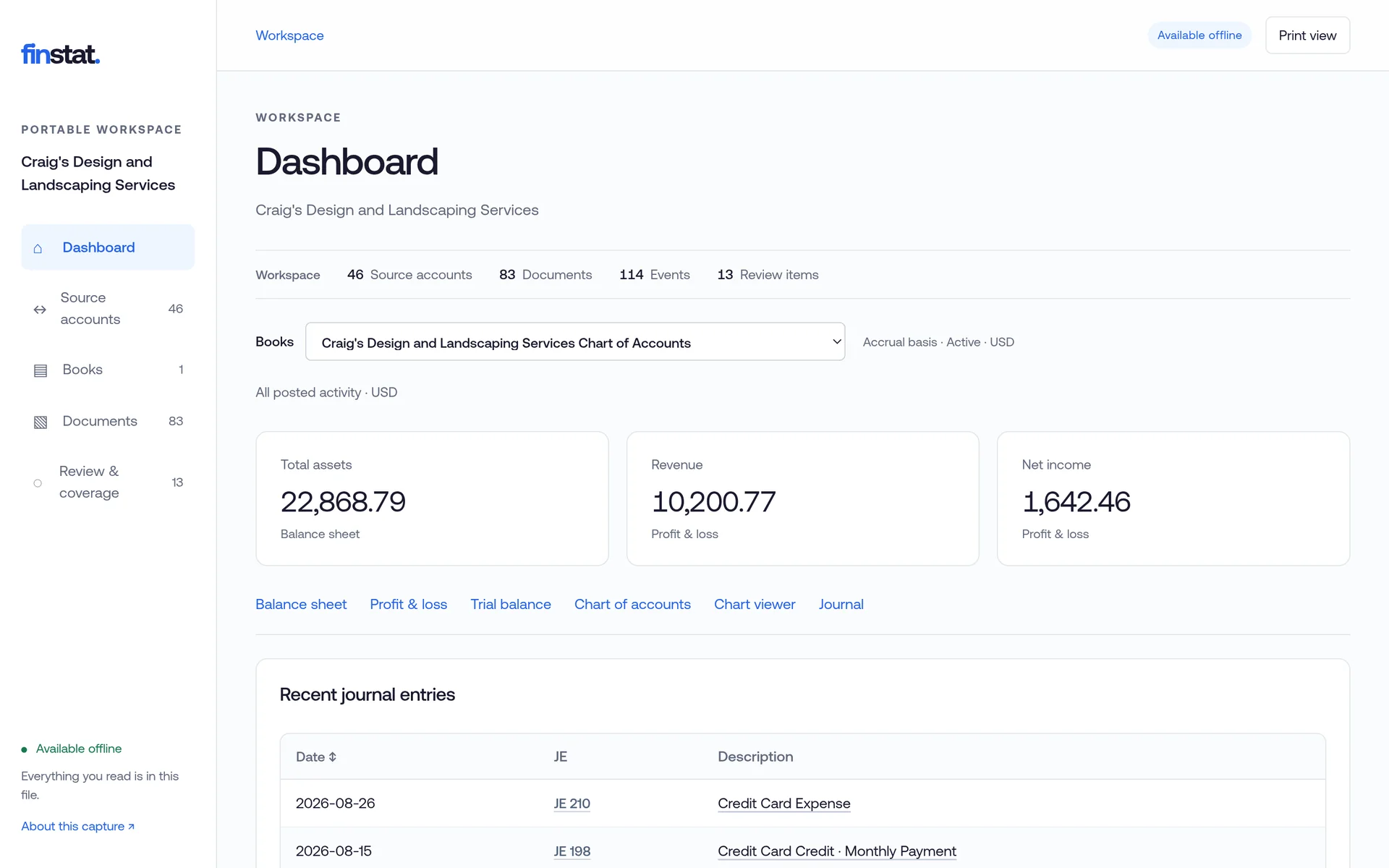
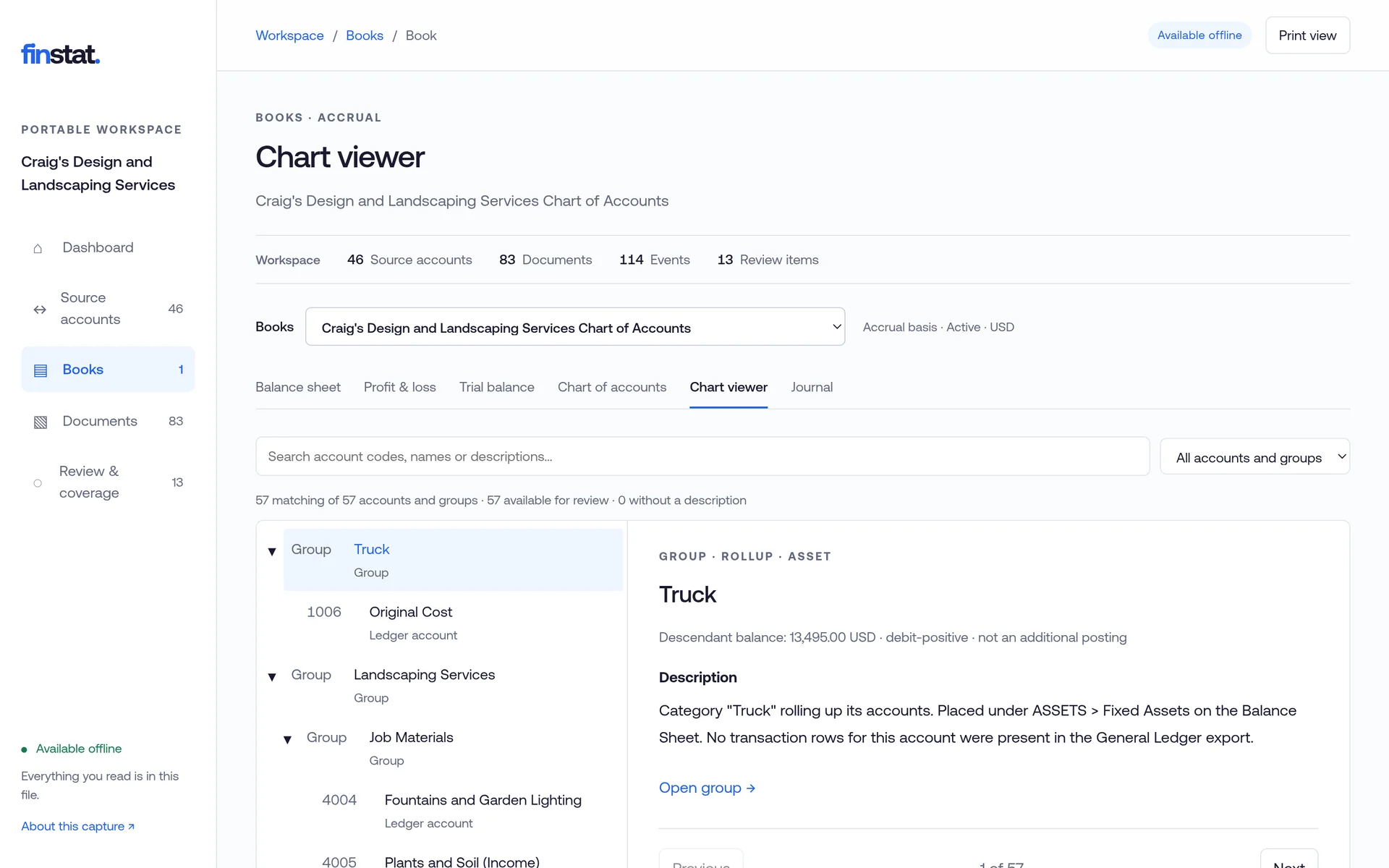
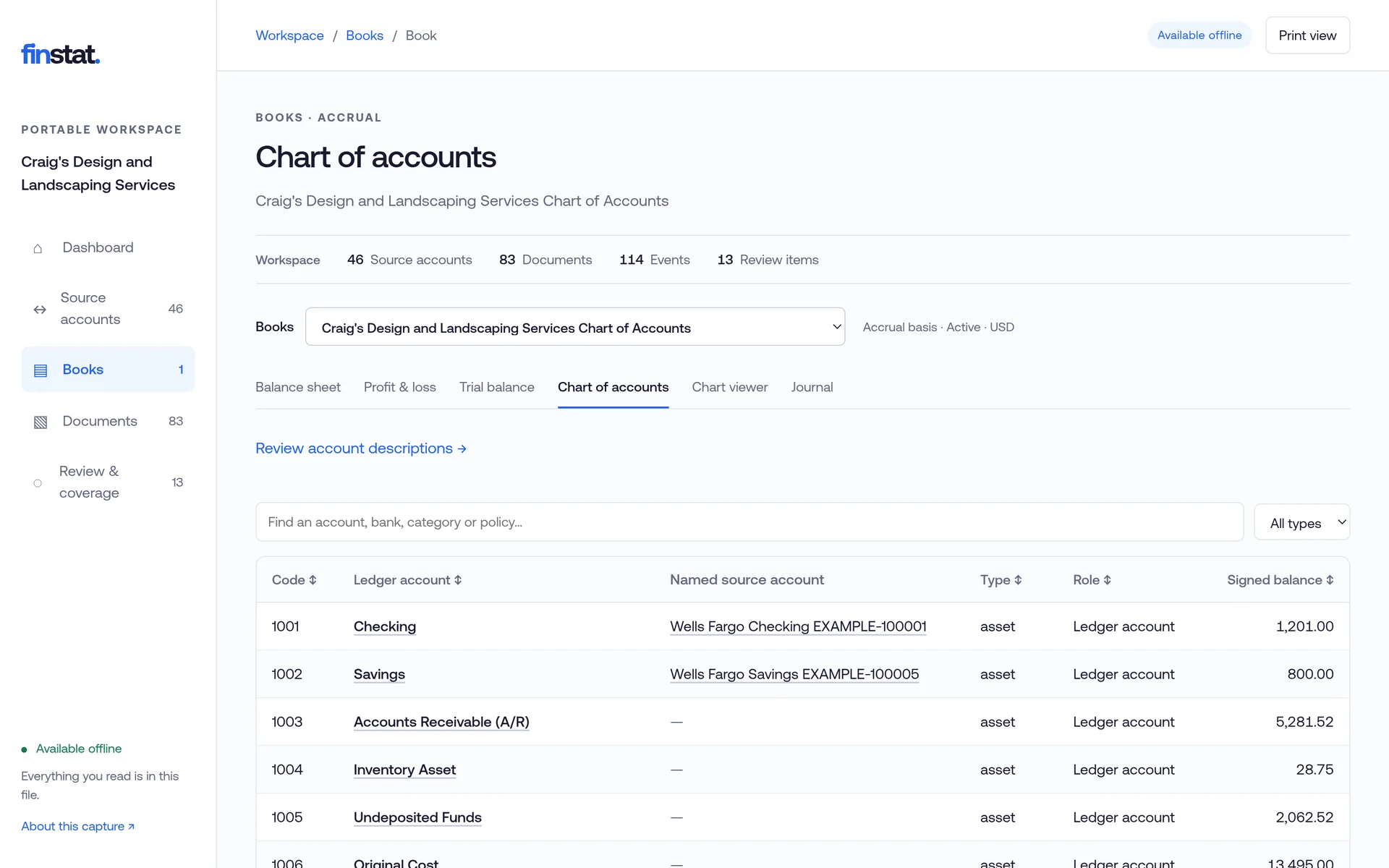
Because the chart is a projection of the facts, it can be as rich as the business needs without anyone re-keying a transaction.
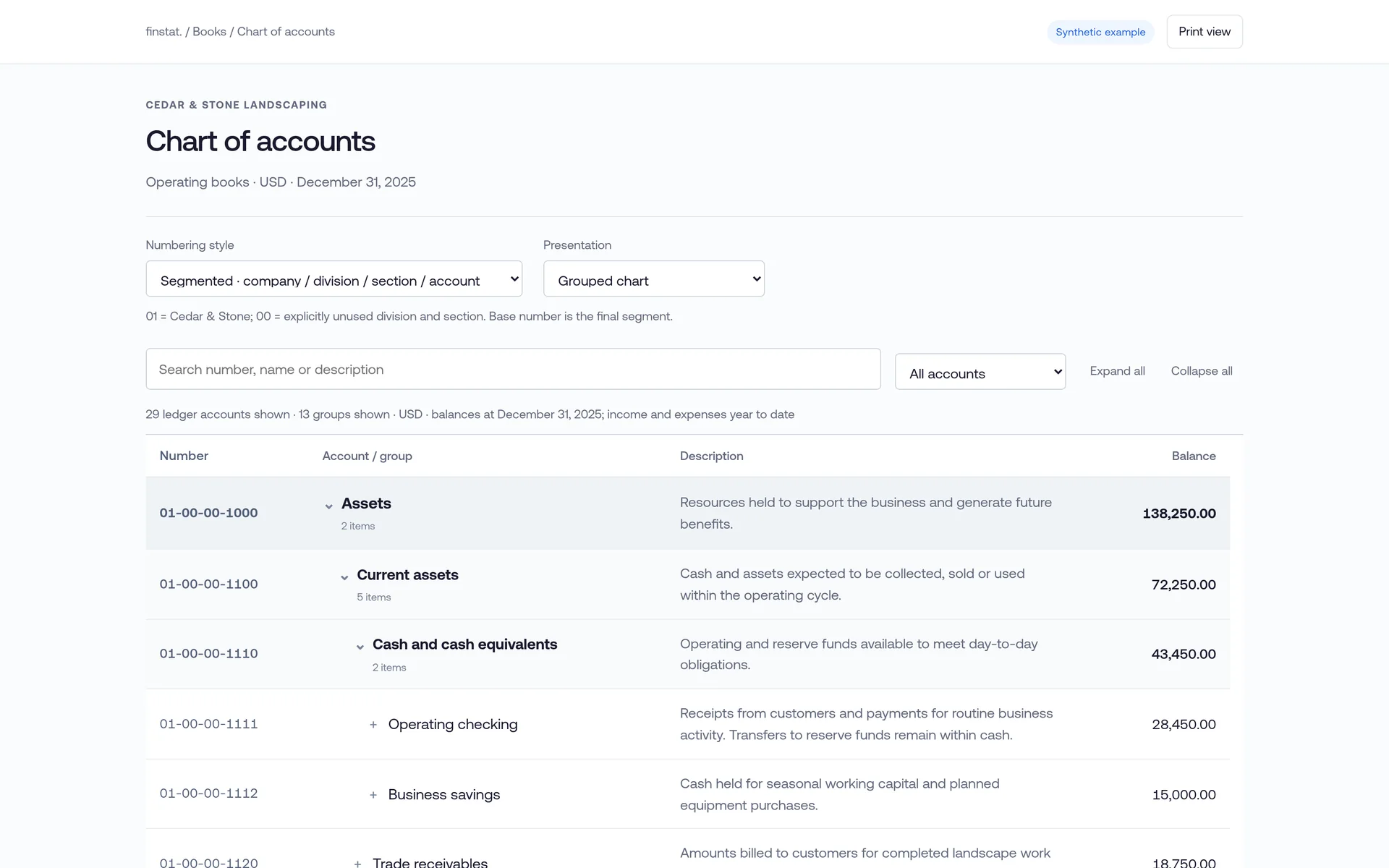
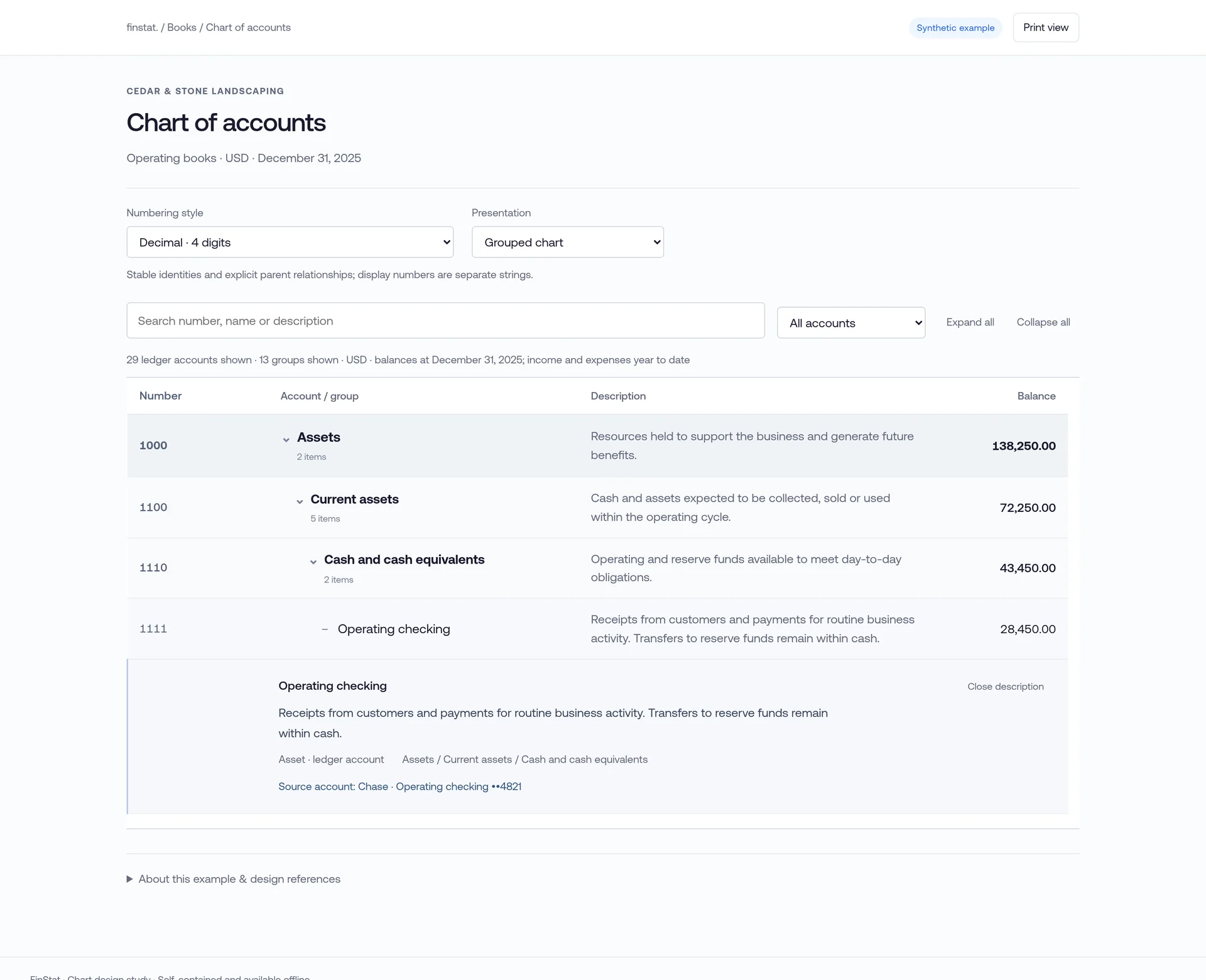
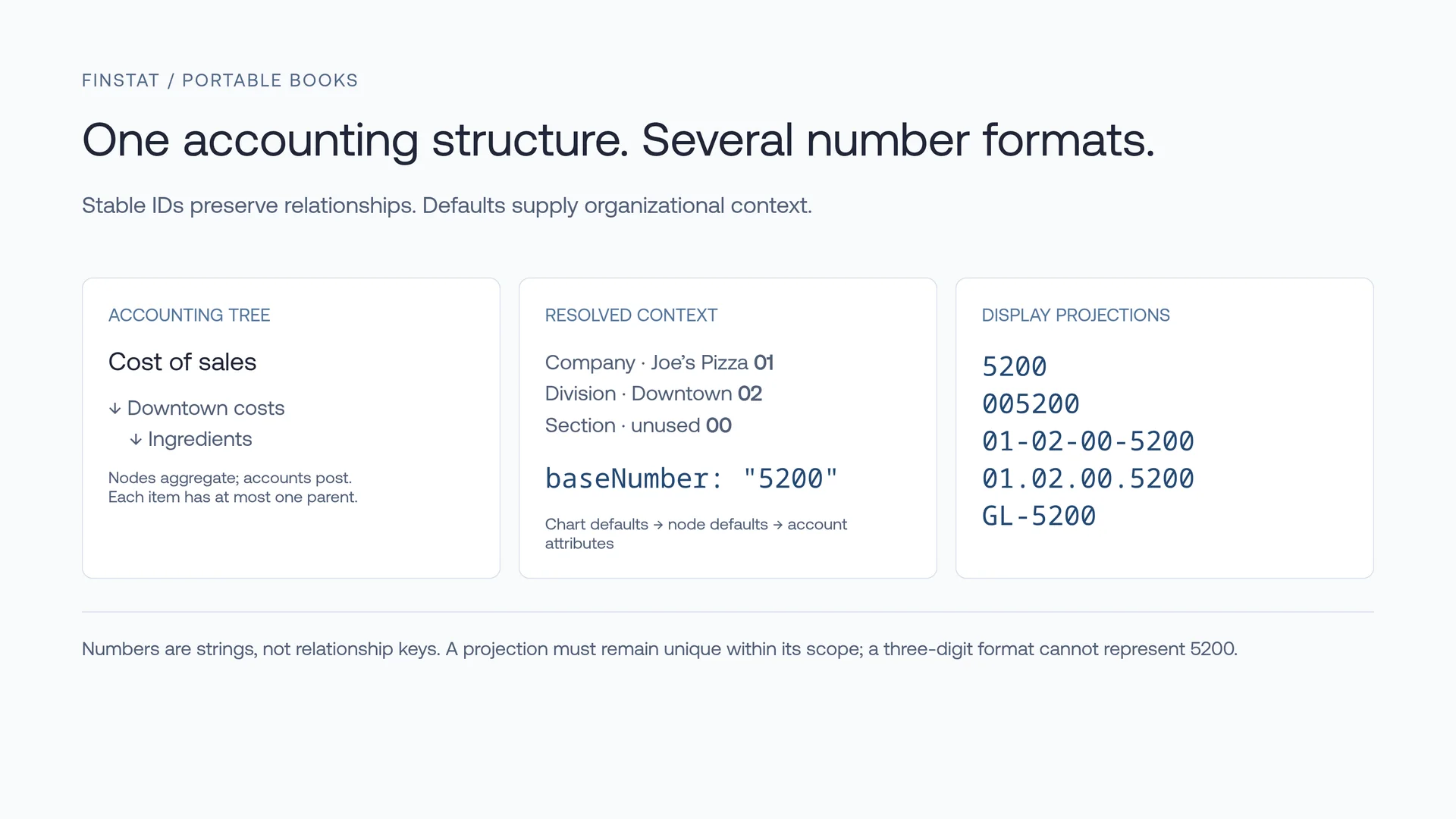
Synthetic example company. The same chart in segmented numbering, one account opened with its description, and the model behind the numbers.
FinStat is fast. Analyze an existing QuickBooks Online export in a few minutes, and import it in a few more. Work that would take a person days, or an AI millions of tokens of reading, runs in FinStat’s engines.
FinStat makes your AI highly efficient. It takes a task from your AI, breaks it into portions, and answers each one with its own engines or with a stable of tuned frontier-model calls from US providers — saving time and tokens. The mathematical structure of the data makes a question far cheaper for FinStat to answer than for your AI to work out from raw rows.
About fifty tools let your AI stay on the high-level task — your goal — and get the job done efficiently.
A seller in diligence, a new client, a year-end catch-up: nobody is handing over a login. FinStat works from the export and the statements.
A trial balance that ties can still hide a purchase posted to income or an opening bill expensed twice. The audit looks at the entries, not the totals.
Closed accounts, old years, a bank with no connection. Your AI hands FinStat the folder; every statement is proven against its own printed balances.
Automation that stops at 95% leaves the hard 5% for a person. FinStat returns those items to your AI with the evidence, so the person sees only real questions.
Craig’s Design and Landscaping Services is the sample company Intuit ships with QuickBooks Online. We exported it, rebuilt the books, and ran the audit. From the zip alone, it caught all five of the company’s known errors:
Each one comes back as a question with the entries behind it. The whole run, from the zip to the finished audit, took about four and a half minutes and $1.61 of model time, and raised 33 issues in all.
Export the company from QuickBooks Online, give the zip to the AI you already use with FinStat connected, and ask what does not tie.