remote MCP engine: live·setups that can reach your files →·1M tokens free
Statements → QuickBooks, Xero & Sage

Bank statements trapped in PDFs? Your AI turns them into import-ready files.

Hand your bank and credit-card statements to your AI, and the FinStat MCP returns clean, categorized files — QBO and OFX for QuickBooks, CSV for Xero, Sage, Excel and anything else.
Connect FinStat →1M tokens free · no credit card
Drop in your statements. Say “make my clean import files.”
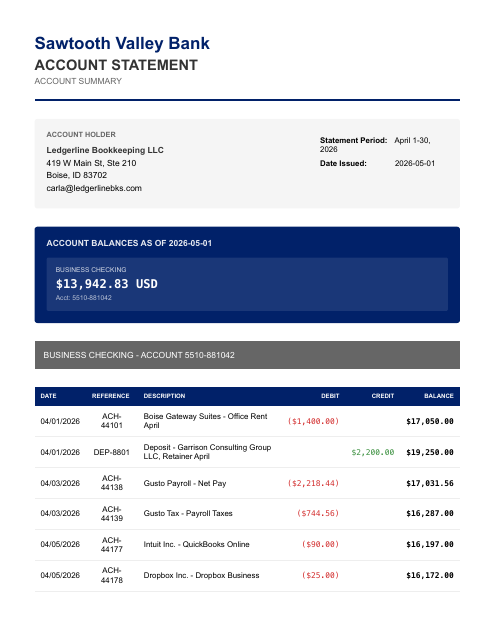
Checking · April
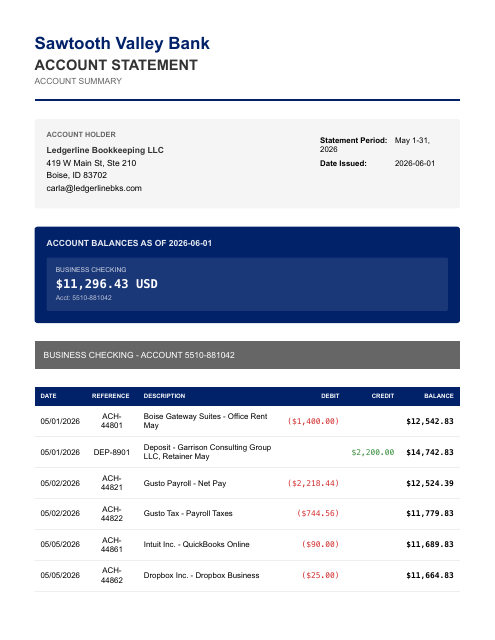
Checking · May
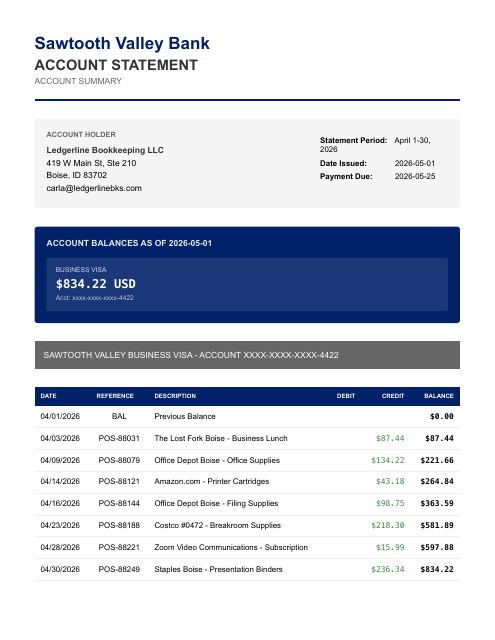
Visa · April

No matter how the bank wrote it. You get clean vendors and data.

On your statement1992 DBT PURCHASE - 271004 STARBUCKS T1C FLL
FinStat writesStarbucks✓ reconciled+ Meals & Entertainment
On your statement812096 PURCHASE-PIN THE HOME DEPOT #1126 GREER
FinStat writesThe Home Depot✓ reconciled+ Supplies
On your statementAplPay BT*DD *DOORDASH SAN FRANCISCO CA
FinStat writesDoorDash✓ reconciled+ Meals & Entertainment
On your statementACH DEBIT 6610-99 ADP WAGE PAY PAYROLL
FinStat writesADP✓ reconciled+ Payroll
FinStat upgradeAdd a chart of accounts and FinStat assigns every line to the right account — the categorization and reports the export alone can't give you.

Same vendor, same name — every time. Your rules just work, the first time.

Import-ready. Vendors cleaned up and statements reconciled.

Statements in · bank · card · Amazon · PayPal
Any
Currencies handled
36+
Works with · Claude Code · Codex · Cursor · Grok Build · Cowork
5
Exports to · QuickBooks · Xero · Sage · Excel
All

Figures from a sample bank-statement export — every transaction tied to its real source line, reconciled and review-ready.

Pick your setup. Books in minutes.

FinStat needs an AI that can open files or folders on your computer — not just a connector in Settings. Seeing FinStat’s tools is not the same as FinStat being able to access the files you want it to.

Your computer
Setups that can reach your files

Claude Code

verified on Windows

Reads the folder you launch it in

Run thisclaude mcp add --transport http finstat https://mcp.finstat.ai/mcp
  1. Open Claude Code in the folder that holds your documents.
  2. Run the command above — it installs FinStat directly, no prompting needed.
  3. Sign in when the browser opens — your free 1M tokens load automatically.
  4. Ask it to run your books on the files in that folder.

You don’t need real statements or documents to learn FinStat. Say Run FinStat Tutorial or Get Started — your AI can make sample documents and walk you through all of it.

Working in a browser tab?

To run books, use a desktop AI that can reach your files. Browser chat alone isn’t enough for FinStat — even if FinStat appears under your connectors.

We only list setups we’ve run books on ourselves. Verified as of 2026-07-20.

  • No API keys
  • No credit card
  • 1M tokens free

It really is that easy.

What is MCP?

The parts that eat your evening. FinStat catches every one.

PAIN_01

Your bank sends PDFs. QuickBooks wants QBO. Nobody bridges the gap — so you re-type every line by hand.

PAIN_02

Generic PDF converters drop transactions, split amounts, and scramble dates — and you don't catch it until reconciliation.

PAIN_03

Scanned statements? Most tools choke before they even start.

PAIN_04

One statement, several accounts — checking, savings, a credit line on a single document. Old tools can't tell them apart, so you separate them by hand.

Vendor-named & reconciled

FinStat reads every transaction off every page — even scanned statements — cleans each line to a real vendor name no matter how the bank wrote it, and reconciles at the statement layer, not against a balance feed. And when one statement covers several accounts at once, FinStat separates each into its own clean export — something the old exporter never could. Out come the exact files each system expects: QBO and OFX for QuickBooks, CSV for Xero, Sage, and Excel. Want it categorized too? Add a chart of accounts and FinStat books every line.

Three steps. Every one secure.

Connect once.

Paste the FinStat connector into your AI host (Claude, Cursor, etc.). Sign in — your free tokens load. No card. Then say: help me get started.

Scoped sign-inYou authenticate with FinStat — your AI never handles your password, and the connector is scoped to the accounting task.

Hand over the documents.

Give your AI your statements, payouts, receipts, and bills — attach them, or on a setup that reads folders, point it at one: upload everything in this folder and give me CSVs to download.

Task-scoped dataYour statements are used only to do the job you asked for — not sold, not shared.

Ask for any report.

Export an OFX file for QuickBooks.Give me a CSV for Xero.Show every transaction, cleaned and named.Clean, import-ready files, in chat.

Nothing off-screenEvery transaction, entry, and assumption shows up in the conversation — your session is the working record, so you can question any number and correct it on the spot.

Built by the BadBank.ai team — the same people who have been turning financial PDFs into accounting data since 2024.

Patents pending